What Is the Dark Web
Is the dark web as scary as the media makes it out to be? This post explores the reality behind onion URLs and debunks common misconceptions, revealing that the vast majority of users are actually seeking legitimate anonymity.
The Media Makes It Scary
You’ve heard about it on the news, social media, or even worse… that one guy named Bob: “The Dark Web is full of criminals and hackers, don’t go to it or you may get a hitman hired to come kill you.”
Are there illegal activities and dangers out there on the dark web? Yes. But not as much as you hear about. In fact, as of November 2020, only about 6.7% of users of the dark web are actually malicious or criminals. The rest are just individuals with legitimate reasons to be that anonymous: whistleblowers, journalists, citizens of countries with heavy censorship, etc.
Origin of Onion Routing
So, what is the dark web really? Like any boring class you had in school, let’s start with the history.
Around 1995, the U.S. Naval Research Laboratory, with the help of DARPA, developed what is called onion routing. This was developed as a type of network for use by various Federal Government roles (such as intelligence officers and CIA operatives) that needed a safe and private way to transmit critical information that shouldn’t be spied on or intercepted. While this network design was effective, the network traffic could still be analyzed which would uncover the transmissions and their contents.
Fast forward some years to 2002: onion routing was released to the public to legally use. But why? Why would the DoD release this to the public if it was used for critical data transmission? Well, it’s simple: More users. The design of onion routing includes a technical feature where the more users there are that are using the network, the harder it becomes to conduct traffic analysis to find the sensitive transmissions. Think of it like blending in with a crowd of people.
How Onion Routing Works
Normal Internet Traffic
When you use your computer or phone to go to the internet such as google.com, that connection uses what is called the Client-Server Model. It is very simple. See the below diagram that visualizes it.
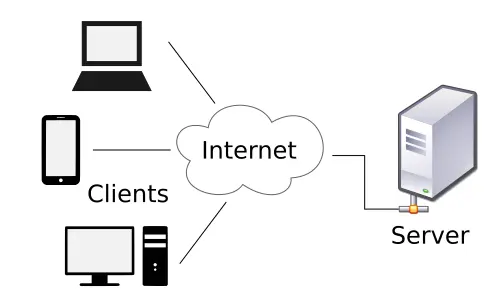
See how simple that is? Your own device is the client and google.com is the server. Traffic flows between the two. That is all there is to it. Well… there is more to it, but I won’t bore you with those details. Though, at a very basic level, that is all there is to it.
With the standard Client-Server model, it isn’t as private and can be controlled by entities like your internet provider. Your internet provider can see what you are sending and where you are sending it to. Let’s look at why this isn’t private using an example. Let’s say you work for a pharmaceutical company. You are aware of a new drug the company made and is shipping it out while hiding a tiny, yet important, ingredient from the FDA. This ingredient can actually be fatal and kill people who use the drug. You know you signed an NDA. Well, you go online to a forum and write about this ingredient to make people actually aware. The information goes viral, even appearing on global news outlets. The company finds out the info came from a post on a forum. The company then obtains a subpoena directed towards your internet provider. Your internet provider complies and finds the IP of the post which is your IP and provides the company with information on who you are. You are then fired and possibly sued.
Onion Routing Traffic
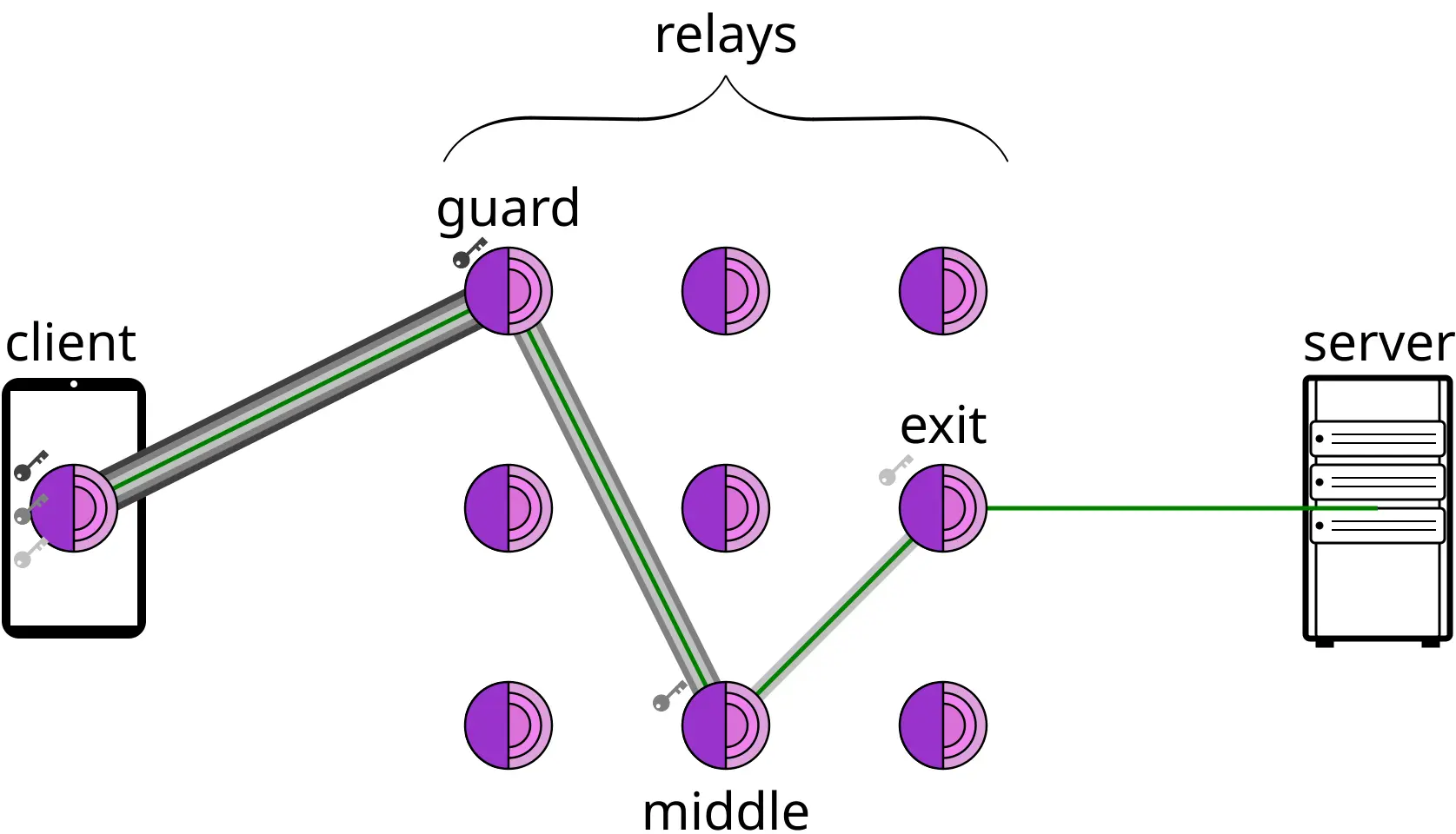
Well, this is where onion routing shines. When connecting via onion routing, instead of the traffic just going between the client and the server, the traffic goes through a circuit that contains the client, server, and the core part of the routing… relay nodes. There are three types of relay nodes: guard node, middle relay node, and exit node. To understand how these nodes work, see the following table that shows the entire circuit traffic will make when using onion routing. I should note, by the way, that when I say Tor network, there is a distinction worth knowing. Onion routing is the method and Tor network is the network that implements the onion routing method.
| Device | Purpose |
|---|---|
| Client | Your computer, smartphone, etc. Knows the guard node is the destination. |
| Guard Node | Traffic’s entrance onto the Tor network. Knows client is the source and middle relay node is the destination. |
| Middle Relay Node | The next stop for the traffic. Knows the guard node is the source and the exit node is the destination. |
| Exit Node | The exit off of the Tor network. Knows the middle relay node is the source and the server is the destination. |
| Server | The service you are trying to reach like Google.com or CNN. Knows the exit node is the source. |
If you didn’t already catch on, there is a pattern as the traffic flows through the Tor network. Each node only sees where the traffic came from and is going to relative to its position. Take a group of human couriers as an example to understand this better.
| Person | Purpose |
|---|---|
| Person A | Writes a message, puts into an envelope, and closes the envelope. The only person they know is courier 1, so they ship it off. They don’t know who the message is really going to. |
| Courier 1 | Receives the envelope from Person A. They open the envelope and put the message into a new envelope. They mark the From field as themself and the To field as Courier 2. They then ship it off. |
| Courier 2 | Receives the envelope from Courier 1. They open the envelope and put the message into a new envelope. They mark the From field as themself and the To field as Courier 3. They then ship it off. |
| Courier 3 | Receives the envelope from Courier 2. They open the envelope and put the message into a new envelope. They mark the From field as themself and the To field as Person B. They then ship it off. |
| Person B | Receives the envelope from Courier 3. They see the message. They don’t know who the message originally came from. |
So, you should now see how onion routing works. Each stop in the network, that stop only sees the immediate FROM and TO system. The Exit Node, for example, will never know who the Client is. It only knows the Middle Relay and Server. And this traffic will go in both directions. The outcome is that the client and server will never know who each other are.
Now, there is one caveat. While the client and server will never know who each other are, your internet provider WILL see that you are using the Tor network. They just won’t see what you are doing on it. This is why some ISPs (Internet Service Providers) may try to block customers from using the Tor network, but it is generally hard to do so.
Let’s look back at that pharmaceutical company example. If you were a whistleblower and used the Tor network to do so, the company would NOT be able to find out who made the post. They wouldn’t even be able to find out which ISP to contact.
Isn’t a VPN the Same Thing?
One common confusion people may make is that using a VPN does the same thing as the Tor network does. Well, when it comes to simply using a method of having a middle man send traffic to/from your device, then yes it is the same to a point. The difference, though, is the visibility the middle man has.
In a standard VPN connection, the middle man is one or more of the VPN provider’s servers. Here’s where the visibility difference comes into play. Your ISP will still see you are using a VPN, but can’t see what you are doing on it. The VPN provider, on the other hand, will be able to see what you are doing on the network as well as who you are. If you simply just need privacy from your ISP and privacy on a public network to make it harder for someone on that same public network to intercept your traffic, then a VPN will suffice. But, if you are doing anything illegal OR ethical with repercussions (like whistleblowing), then it comes down to if the VPN provider collects logs of what you do AND if they do comply with subpoenas for those logs. Some VPN providers market themselves as ’no logging’, such as NordVPN, but there’s no guarantee they’re being truthful about it. Though, there are some VPN services that do offer benefits that can add some privacy, such as Mullvad which doesn’t take in a username or email when one creates an account, but rather generates them an account number to use which is used to log into the VPN. So, this comes down to how much you trust the provider.
In a Tor network connection, the visibility situation is much more private. Because a server can’t see who the client is and vice versa due to the use of the guard, middle relay, and exit nodes, you don’t have to worry about trusting someone with keeping your activity a secret because nobody knows WHAT your activity even is and doesn’t really know who you even are.
What About the Illegal Activities Then?
Now that you hopefully understand how onion routing and the Tor network function, let’s talk about what was mentioned at the start of this post: crime and illegal activity.
When you access the Tor network, it feels like a normal browser. You can still go to sites like google.com, facebook.com, etc. These sites are what we call the surface web - websites that are accessible from normal browsers like Chrome and Firefox. Then, we go down to the dark web which, when security professionals call it that, they are referring to the websites that are NOT accessible with normal browsers. Instead these websites will have interesting URLs to access them instead of something simple and readable like google.com. These sites, instead of using top-level domains like .com and .net, use .onion. And instead of the domain being readable like facebook and google, they use a random string of characters. These characters aren’t randomly typed characters, the string is actually created using a type of encoding called base32. The random characters you see are the encoded output. An example dark web URL can look like: http://xqk29fpzs4mv7wjhbo3ycnt85adyrl6egiu0h2mxkzvfj6toqp3s4id.onion
Let’s just randomly go to a dark web URL now! Oh wait… it’s intentionally not that simple. First off, normal browsers cannot resolve .onion addresses as .onion is not a real DNS domain and not part of the overall internet, so DNS providers won’t have access to it. And for those not familiar with DNS, it stands for Domain Name System. You should be thankful to have it. It is why you don’t have to actually find which IP address a website is actively using and type that IP into your address bar in your browser and instead you can just type in an easy-to-remember human-readable string like google.com. Computers, on the other hand, don’t know these words, they just know IP addresses. So, DNS acts as a translator between us and our machines. We say we want to go to google.com. Our machine doesn’t know what that is, so it calls upon DNS (using a DNS provider like your ISP or a free public one like Google or Cloudflare), to find which IP address is associated with that gibberish (gibberish to the machine that is) and then connects to the IP that DNS gives it which then takes you to where you wanted to go. So, DNS providers don’t know any .onion domains.
Second off, the random characters makes it hard for people to randomly guess the URLs. This is intentional as .onion websites that are used for illegal activity don’t want to be easily found, and instead rely on referrals. And some of these sites also require you to request access to their sites.
But, it should be stated that not all .onion sites are for illegal stuff. Only about 60% of .onion sites are used for illegal activities. Some of them are just legitimate. Even Facebook has a .onion version of Facebook.
Now, how would you even know where to find ANY .onion URL? Well, just like the surface web has search engines like Google, DuckDuckGo, and my personal favorite, Kagi, the dark web has its own search engines that are able to allow users to search for words or phrases and find .onion sites that are relevant to what you are searching for.
How to Access the Tor Network
If you want that nice privacy that comes with the Tor network/onion routing, you can easily do so by getting a client made to connect you to it with the most recommended one, again, being the Tor browser.
BUT WAIT!!!
It isn’t some magic pill to keep you private. You still need to ensure due diligence to keep your privacy intact. So long as you don’t go to illegal/shady sites on the dark web, you don’t need to worry about your own safety from malicious individuals on the Tor network, but there are ways that can turn that around and make you actually traceable - this is preventable by practicing OPSEC.
OPSEC stands for Operational Security. Essentially, it refers to practices of not sharing anything that is related to you to keep you private. So, ensure you practice proper OPSEC. Below are some ways to do so:
- Do not log into any online account that you have. Someone can use this to find you by seeing your name, email address, etc.
- Don’t search up anything related to you like local news from where you live or schools you attended.
- Don’t buy anything online unless you use a very private payment method like cryptocurrency (but really, just don’t buy anything at all because stuff that you can buy on the dark web is likely illegal anyways).
The Legality
Last, but not least, let’s briefly talk about the legality of using the Tor network.
Using the Tor network including a client to connect to it like the Tor browser itself is completely legal in MOST countries. See your own country’s laws to be safe, but for the USA users out there, it is legal.
Hosting nodes. Anyone can contribute to the Tor network by hosting either guard, middle relay, or exit nodes or a mix of them. Again, doing so in most countries (like the USA) is completely legal. But, there are some things to know about hosting a node. If you host a guard or middle relay node, you won’t see what the content of any traffic is. If you host an exit node, you can see the content, but only if it’s unencrypted.
Operating any node can carry a risk, but not one that will get you sued or prosecuted. If cyber crime is being investigated and law enforcement believes your node was used for the traffic to travel through, they may confiscate your node and any equipment that may be used alongside the node. Law enforcement finds use out of exit nodes, but some law enforcement may mistakenly confiscate a guard or middle relay node thinking it’s the exit node when it isn’t. All that will happen to you is that you may have to wait awhile until law enforcement is done with your equipment and return it to you with no guarantees on the condition it will be in when they do return it. So long as you comply with law enforcement in this type of situation, you will be fine.
You are Fine to Use it
Hopefully this post has been informative for anyone reading it and gives them more of an understanding that so long as they use it legally and safely, they are totally fine to use the Tor network to ensure they have privacy from their ISP and from sites that normally track and collect data on users like news sites. Just get out there and enjoy the privacy! Or, if you still don’t feel comfortable using it, you can donate to Tor network clients like the Tor browser/Tor project to help keep them running and ensuring privacy for others who need it and/or want it!